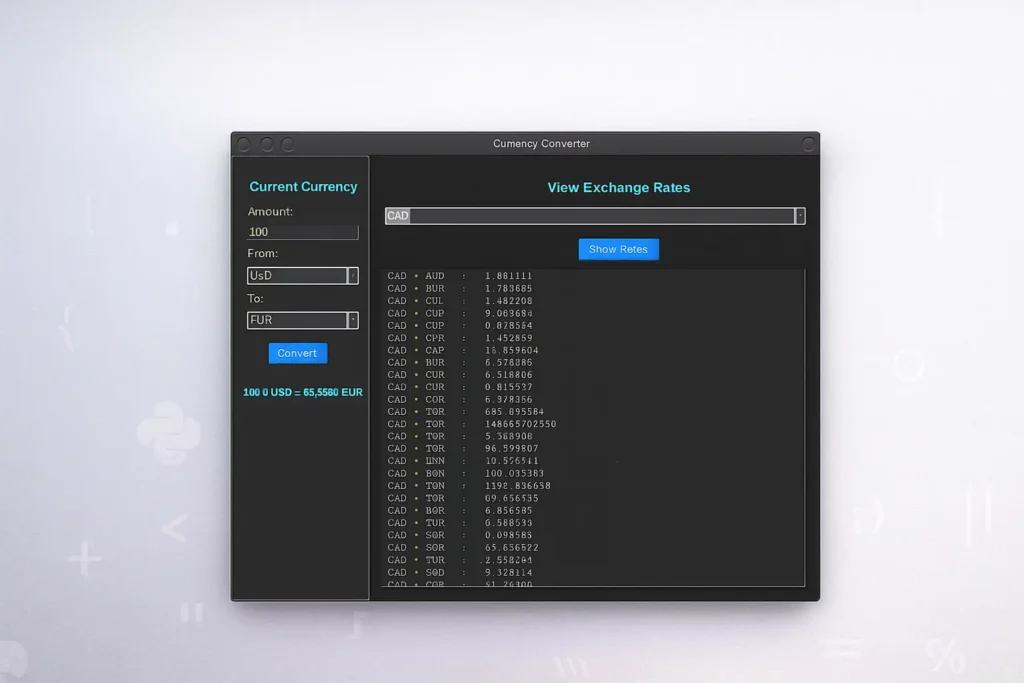
import tkinter as tk
from tkinter import ttk, messagebox
import requests

# ----------------------------------------------------
# Fetch data once at start
# ----------------------------------------------------
def fetch_data():
    try:
        resp_currencies = requests.get("https://api.frankfurter.app/currencies")
        resp_currencies.raise_for_status()
        currencies_data = resp_currencies.json()

        base_currency = "USD"
        resp_rates = requests.get(f"https://api.frankfurter.app/latest?from={base_currency}")
        resp_rates.raise_for_status()
        rates_data = resp_rates.json()

        return currencies_data, rates_data["rates"], base_currency

    except Exception as e:
        messagebox.showerror("Error", f"Failed to fetch data:\n{e}")
        return None, None, None

currencies, rates, base = fetch_data()
if currencies is None:
    exit()

rates[base] = 1.0
currency_list = list(currencies.keys())

# ----------------------------------------------------
# Convert Logic
# ----------------------------------------------------
def convert_local():
    try:
        amount = float(entry_amount.get())
    except:
        messagebox.showerror("Error", "Please enter a valid amount")
        return

    from_curr = cb_from.get()
    to_curr = cb_to.get()

    result = amount * (rates[to_curr] / rates[from_curr])
    lbl_conv_result.config(text=f"{amount} {from_curr} = {result:.4f} {to_curr}")

# ----------------------------------------------------
# Show rates table
# ----------------------------------------------------
def show_rates():
    selected = cb_view.get()
    txt_rates.delete("1.0", tk.END)

    for curr, value in rates.items():
        result = value / rates[selected]
        txt_rates.insert(tk.END, f"{selected} → {curr}   :   {result:.6f}\n")

# ----------------------------------------------------
# GUI (Dark Theme)
# ----------------------------------------------------
root = tk.Tk()
root.title("Currency Converter")
root.geometry("800x500")
root.resizable(True, True)
root.configure(bg="#1e1e1e")

fg_text = "#ffffff"
accent = "#4cc9f0"
btn_color = "#3a86ff"
frame_bg = "#2b2b2b"

style = ttk.Style()
style.theme_use("clam")

style.configure("TCombobox",
                fieldbackground="#3a3a3a",
                background="#3a3a3a",
                foreground="white")

# --------------- LEFT SIDEBAR --------------
left_frame = tk.Frame(root, width=250, padx=15, pady=15, bg=frame_bg, relief="groove", borderwidth=2)
left_frame.pack(side="left", fill="y")

lbl_title = tk.Label(left_frame, text="Convert Currency", font=("Arial", 14, "bold"), fg=accent, bg=frame_bg)
lbl_title.pack(pady=10)

tk.Label(left_frame, text="Amount:", fg=fg_text, bg=frame_bg).pack(anchor="w")
entry_amount = tk.Entry(left_frame, bg="#3a3a3a", fg="white", insertbackground="white")
entry_amount.pack(fill="x", pady=5)

tk.Label(left_frame, text="From:", fg=fg_text, bg=frame_bg).pack(anchor="w")
cb_from = ttk.Combobox(left_frame, values=currency_list)
cb_from.pack(fill="x", pady=5)
cb_from.current(0)

tk.Label(left_frame, text="To:", fg=fg_text, bg=frame_bg).pack(anchor="w")
cb_to = ttk.Combobox(left_frame, values=currency_list)
cb_to.pack(fill="x", pady=5)
cb_to.current(1)

btn_convert = tk.Button(left_frame, text="Convert", command=convert_local,
                        bg=btn_color, fg="white", activebackground="#4cc9f0")
btn_convert.pack(pady=10)

lbl_conv_result = tk.Label(left_frame, text="", font=("Arial", 11, "bold"), fg=accent, bg=frame_bg)
lbl_conv_result.pack(pady=10)

# ------------- RIGHT CONTENT --------------
right_frame = tk.Frame(root, padx=20, pady=20, bg="#1e1e1e")
right_frame.pack(side="right", fill="both", expand=True)

lbl_view = tk.Label(right_frame, text="View Exchange Rates", font=("Arial", 14, "bold"),
                    fg=accent, bg="#1e1e1e")
lbl_view.pack(pady=10)

cb_view = ttk.Combobox(right_frame, values=currency_list)
cb_view.pack(pady=5, fill="x")
cb_view.current(0)

btn_view = tk.Button(right_frame, text="Show Rates", command=show_rates,
                     bg=btn_color, fg="white", activebackground="#4cc9f0")
btn_view.pack(pady=10)

txt_rates = tk.Text(right_frame, width=50, height=20, font=("Courier", 10),
                    bg="#2b2b2b", fg="white", insertbackground="white")
txt_rates.pack(fill="both", expand=True)

root.mainloop()